

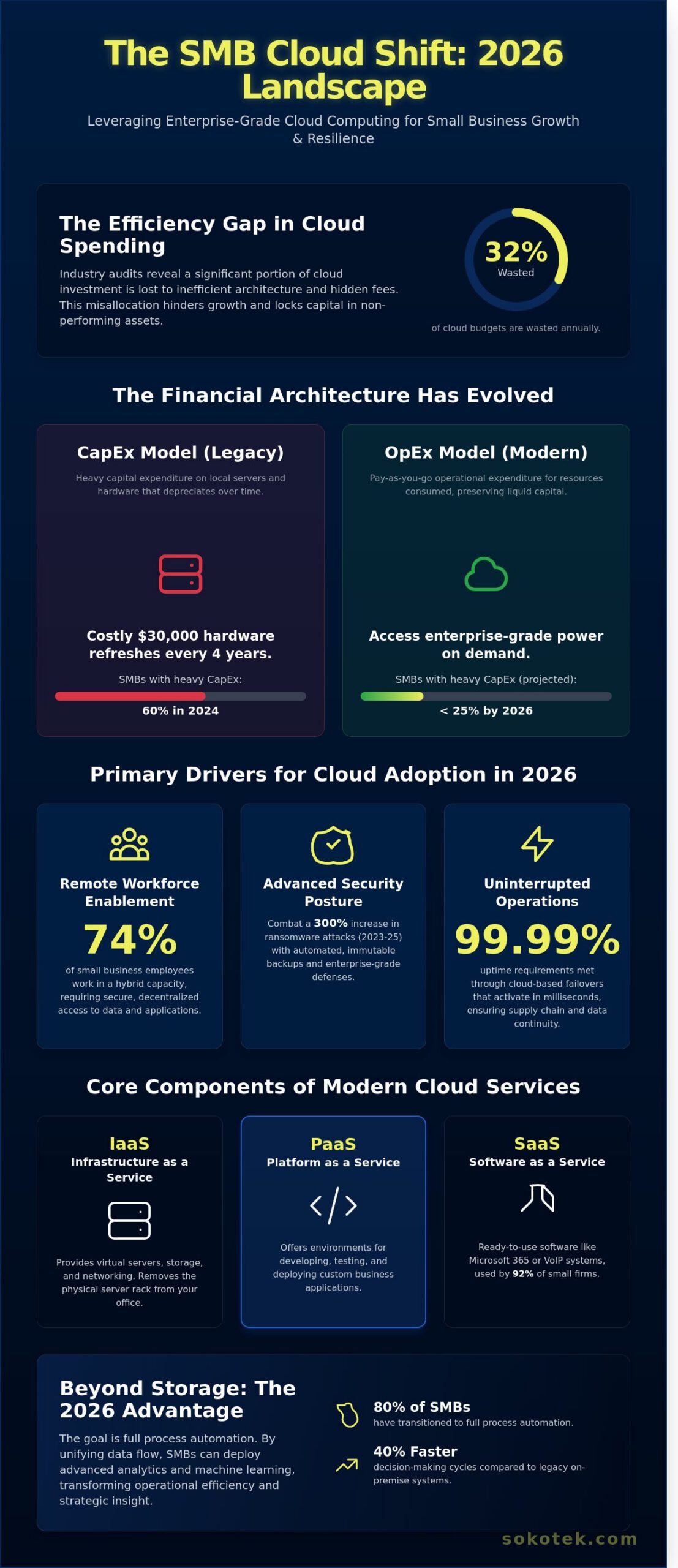
According to recent 2024 industry audits, 32% of cloud budgets are wasted annually due to inefficient architecture and hidden subscription fees. You likely recognize that migrating your operations is a technical necessity for scaling, yet the complexity of the transition often feels like a liability rather than a strategic asset. It’s a common concern that shifting away from local servers might expose your firm to security vulnerabilities or unpredictable billing cycles that disrupt your cash flow. This strategic guide demonstrates how to leverage enterprise-grade cloud computing services for small business to achieve 99.9% system availability and fixed monthly costs without the need for an expansive internal IT department.
We’ve engineered this roadmap to address the specific technical requirements of 2026, focusing on precision migration and data sovereignty. You’ll learn how to deploy a secure, scalable infrastructure that supports a seamless remote workforce while maintaining strict compliance with evolving international standards. We’ll examine the exact hardware-software integrations and professional support structures required to transform your digital environment into a high-performance, cost-effective engine for growth. This analysis provides the technical clarity you need to make an informed investment in your company’s digital resilience.
Key Takeaways
- Transition from capital expenditure to an operational model to optimize your budget while gaining on-demand access to enterprise-grade computing power.
- Understand the Shared Responsibility Model to ensure your business data remains more secure in a cloud environment than on traditional local servers.
- Evaluate public, private, and hybrid models to select the most scalable and cost-effective cloud computing services for small business based on your specific industry requirements.
- Implement a structured migration roadmap, starting with a comprehensive hardware audit, to ensure a seamless transition to a modern cloud architecture.
- Discover how proactive managed solutions prevent security gaps and system failures, providing a stable foundation for long-term technical growth.
What is Cloud Computing for Small Business in 2026?
In 2026, the technical foundation of a competitive enterprise relies on the on-demand delivery of computing power, database storage, and specialized applications via the internet. To understand What is Cloud Computing in a professional context, one must view it as a utility-based model where hardware constraints no longer dictate operational capacity. For a firm employing 10 to 50 people, cloud computing services for small business provide the same high-tier infrastructure once reserved for global corporations. This shift ensures that processing power scales automatically with demand, preventing system bottlenecks during peak operational hours.
The financial architecture of IT has fundamentally shifted. In 2024, roughly 60% of SMBs still carried heavy capital expenditure (CapEx) for local server maintenance and physical hardware depreciation. By 2026, this figure has dropped below 25%. Modern businesses prioritize operational expenditure (OpEx), paying only for the resources they consume on a monthly or annual basis. This transition eliminates the need for costly $30,000 hardware refreshes every four years; it allows capital to remain liquid for core industrial or service-based investments rather than being locked in depreciating office assets.
2026 marks the era of the ‘Hybrid SMB’. This model integrates local edge computing for immediate reliability with the massive scale of the public cloud. It’s a pragmatic response to the 99.99% uptime requirements of modern supply chains. If a local network fails, cloud-based failovers activate within milliseconds, ensuring continuity. This redundancy is no longer a luxury; it’s a technical requirement for any business handling 500+ daily transactions or managing complex inventory databases that require constant synchronization.
Remote work flexibility remains a non-negotiable driver for this technology. Statistics from early 2026 indicate that 74% of small business employees work in a hybrid capacity at least three days per week. Without cloud-based identity management and secure access protocols, these decentralized teams cannot function securely. Automated data redundancy also protects against the 300% increase in ransomware attacks recorded between 2023 and 2025. Cloud providers now include automated, immutable backups as a standard feature, ensuring that a single security breach doesn’t result in permanent data loss.
The Core Components of Modern Cloud Services
Cloud architecture follows three distinct delivery models. Software as a Service (SaaS) covers tools like Microsoft 365 and cloud-integrated VoIP systems used by 92% of small firms. Infrastructure as a Service (IaaS) provides virtual servers and networking, removing the physical rack from the office. Platform as a Service (PaaS) offers the specific environments necessary for developing custom business applications, ensuring that software deployment remains agile and standardized across the entire organization.
Why SMBs are Moving Beyond Simple Cloud Storage
Storing files in a digital drive was the standard in 2018. By 2026, 80% of small businesses have transitioned to full process automation. Investing in integrated cloud computing services for small business allows for the deployment of machine learning algorithms that predict stock shortages before they occur. Real-time collaboration serves as a primary competitive advantage. When data flows through a unified cloud environment, decision-making cycles shorten by 40% compared to legacy on-premise systems.
The Security-First Architecture: Protecting Your Business Data
The belief that a physical server locked in an office closet offers superior protection is a persistent misconception. While local hardware feels tangible, it lacks the multi-layered physical and digital defenses of a Tier 4 data center. Statistics from the 2023 IBM Cost of a Data Breach Report show that the average cost of a breach for small organizations reached $3.31 million. Moving to cloud computing services for small business doesn’t just shift your data; it upgrades your security posture to an enterprise grade that’s impossible to replicate on a local budget.
Security in this environment operates under the Shared Responsibility Model. This framework defines a clear boundary between the provider’s duties and your internal protocols. The cloud provider secures the underlying infrastructure, power, and physical hardware; you remain responsible for the data, identity management, and specific configurations. Understanding this division is vital. If a user leaves a storage bucket public, the provider isn’t at fault. It’s a partnership where both sides must execute their roles with technical discipline.
Engineering precision is the only way to prevent misconfiguration leaks. Gartner research indicates that through 2025, 99% of cloud security failures will be the customer’s fault, primarily due to improper setup. We don’t view security as a one-time setup task. It’s a continuous engineering process. Our cloud computing services for small business focus on hardening the environment from day one. This involves disabling unnecessary ports, enforcing strict API protocols, and ensuring that every virtual asset follows a documented security blueprint.
SOKOTEK’s approach treats proactive monitoring as a non-negotiable standard. We don’t wait for an alert to investigate a system’s health. Our team utilizes automated scanning tools that check for anomalies every 60 seconds. This constant vigilance ensures that unauthorized changes or suspicious traffic patterns are identified and neutralized before they escalate into a system-wide incident. For organizations requiring this level of technical oversight, our managed security frameworks provide the necessary guardrails for stable growth.
Zero Trust and Identity Management
Passwords are no longer a sufficient defense against modern credential harvesting. Microsoft data shows that Multi-Factor Authentication (MFA) blocks 99.9% of account compromise attacks. We implement Zero Trust architectures where “never trust, always verify” is the default setting. This includes conditional access policies that evaluate the user’s location, device health, and IP address before granting entry. By applying ‘Least Privilege’ protocols, we ensure employees only access the specific datasets required for their roles, which significantly limits the “blast radius” of any potential internal error.
Compliance and Regulatory Engineering
Meeting HIPAA, SOC2, or PCI-DSS standards requires more than just a checkbox; it requires architectural integrity. We solve the challenge of data sovereignty by configuring your environment to store data within specific geographic regions, ensuring you remain compliant with EU or local regulations. Data Encryption at Rest refers to the cryptographic protection of information while it is stored on physical media, ensuring that even if hardware is stolen, the raw data remains unreadable without the specific decryption key. This methodical approach to compliance removes the guesswork from audits and protects your reputation in high-stakes industries.
Public, Private, or Hybrid? Choosing Your Cloud Model
Selecting a deployment model requires a technical audit of current infrastructure and future growth projections. The choice determines how your data is stored, who manages the physical hardware, and how easily your systems can scale during peak demand. For most organizations, the decision rests on balancing resource control against operational flexibility. Engineering a system that matches your specific workload is more critical than simply following market trends.
Public cloud environments like AWS or Microsoft Azure utilize shared physical hardware while maintaining strict logical isolation. For a company seeking cloud computing services for small business, the primary advantage is the elimination of capital expenditure (CAPEX) on server hardware. In 2023, the average cost of a mid-range physical server often exceeded $5,000; public cloud replaces this with a predictable operational expense (OPEX). Private clouds, by contrast, provide dedicated compute and storage resources. This eliminates the “noisy neighbor” effect. This is a common issue where other tenants on a shared server consume excessive bandwidth or CPU cycles, which can degrade your application performance without warning.
Hybrid cloud models represent the most pragmatic approach for established firms. A 2023 industry report found that 72% of SMBs utilize a hybrid strategy to keep sensitive customer data on-site while offloading web-facing applications to the public cloud. This architecture requires robust middleware but prevents the total loss of control associated with 100% off-site migrations. It allows for a staged transition that doesn’t disrupt existing production workflows.
Comparison of Top Cloud Providers for SMBs
Microsoft Azure remains the logical choice for the 85% of businesses already integrated into the Windows ecosystem. It offers seamless Active Directory synchronization and native support for Office 365. Amazon Web Services (AWS) provides the most extensive catalog of granular tools; it’s superior for high-performance computing and bespoke software development. Google Cloud Platform (GCP) excels in data analytics and machine learning. GCP is often preferred by creative teams who rely on real-time collaborative tools and large-scale data processing.
When a Private Cloud Makes More Sense
Compliance often dictates infrastructure requirements. In legal and medical sectors, GDPR or HIPAA standards may necessitate the physical data isolation that only a private cloud provides. If your operations rely on custom legacy software built for specific kernel versions or hardware configurations, public clouds might not offer the necessary compatibility. A private setup ensures 100% resource availability. This is critical for industrial automation where millisecond latency can disrupt production lines or synchronization.
Long-term financial planning must account for vendor lock-in and egress fees. While entering the cloud is often inexpensive, moving 10TB of data out of a primary provider can cost upwards of $800 in transfer fees alone. Relying on proprietary APIs can make future migrations technically difficult and expensive. It’s essential to evaluate these exit costs before committing to a single-vendor ecosystem. Successful implementation of cloud computing services for small business depends on maintaining a portable architecture. This allows for future transitions if pricing or performance standards shift. Focus on interoperability to ensure your technology stack remains an asset rather than a liability.
Navigating Your Cloud Migration: A Practical Roadmap
Implementing cloud computing services for small business requires a structured engineering framework to avoid operational bottlenecks. It isn’t just about moving files; it’s about re-platforming your operational logic. A successful transition follows a five-phase methodology designed to ensure system stability and data integrity.
- Phase 1: Asset Audit. Conduct a granular inventory of all local hardware and software. In 2023, 28% of migration delays were caused by incompatible legacy firmware. Identify which applications are “cloud-ready” and which require refactoring.
- Phase 2: Architecture Selection. Choose between public, private, or hybrid models. Most small firms benefit from a 70/30 hybrid split. This keeps sensitive data on-site while leveraging the cloud for scalable compute power.
- Phase 3: Pilot Testing. Deploy a 5% sample of your workload to the new environment. Use checksums to verify data integrity and ensure zero packet loss during the transfer.
- Phase 4: The Cut-over. Execute the final synchronization during a predefined 6-hour maintenance window. This minimizes the impact on client-facing operations and prevents revenue loss.
- Phase 5: Optimization. Review system performance after the first 90 days. Businesses typically see a 15% reduction in operational costs after fine-tuning their resource allocation during this stage.
The selection of cloud computing services for small business must align with specific technical requirements, such as IOPS performance and latency thresholds. Without this alignment, the system won’t deliver the promised efficiency gains.
Common Pitfalls in Small Business Migrations
Underestimating bandwidth is a primary cause of post-migration latency. A 50-employee firm usually needs a 200 Mbps symmetrical connection to maintain productivity during simultaneous cloud syncs. Hidden egress fees also disrupt budgets; for instance, transferring 10 TB of data out of certain public clouds can cost over $800 in unexpected line items. Finally, 45% of data loss incidents during migration occur because teams didn’t verify their pre-migration backup integrity before starting the transfer.
Ensuring Business Continuity
A fail-back plan serves as your technical safety net. It allows you to revert to on-premise systems within 60 minutes if the cloud environment experiences critical latency during the first 48 hours. You must also verify your VoIP system’s Quality of Service (QoS) settings to ensure voice traffic takes priority over background data syncs. Maintain three distinct copies of your data on two different storage media, ensuring one of those copies stays offsite in a secure cloud environment. This technical discipline ensures that even a catastrophic hardware failure won’t result in permanent data loss.
If you’re ready to modernize your infrastructure with precision-engineered solutions, consult with our technical specialists to design your migration strategy.
Managed Cloud Solutions: The SOKOTEK Advantage
Small businesses often attempt to manage their own cloud environments to reduce overhead. However, data from 2023 indicates that organizations waste approximately 28% of their cloud budget due to inefficient resource allocation and idle instances. DIY management frequently results in misconfigured storage buckets and unpatched vulnerabilities. SOKOTEK treats cloud computing services for small business as a precision engineering task rather than a simple subscription. We eliminate the technical guesswork that leads to the 40% increase in security breaches typically seen in unmanaged environments. Our approach ensures that every virtual resource serves a specific functional requirement.
We don’t wait for your team to report a system failure. Our infrastructure utilizes real-time telemetry to identify anomalies before they disrupt your workflow. If a server instance hits 95% CPU utilization or a database connection latency exceeds 200ms, our engineers receive an automated alert. This proactive stance ensures 99.99% uptime for critical business applications. It moves your IT strategy from a reactive “break-fix” model to a state of continuous operational stability.
Based in California, SOKOTEK provides the high-touch service of a local partner while maintaining the infrastructure capacity to support national operations. Whether your team is located in Palm Desert or San Diego, you receive technical expertise that understands regional compliance requirements like the CCPA. We leverage global cloud backbone providers to ensure your data is accessible, yet we remain accountable through direct, professional communication. We integrate cloud computing services for small business with comprehensive Managed IT and Cybersecurity protocols to create a unified, resilient technical environment.
Beyond the Migration: Ongoing Optimization
Successful cloud adoption requires more than a one-time setup. Our engineering team conducts quarterly business reviews to analyze usage patterns and adjust configurations. In 2024, these reviews helped our clients reduce monthly cloud overhead by an average of 15% through rightsizing underutilized instances. We handle continuous patch management and security updates on a disciplined 24-hour cycle. As your user count increases from 10 to 150, our support framework scales without requiring a complete system overhaul. We prioritize functional longevity over temporary fixes.
Why SOKOTEK is Your Strategic Technology Partner
With over 15 years of experience in systems integration and technical consulting, SOKOTEK brings a disciplined, engineering-led approach to your digital infrastructure. We don’t just sell software; we design architectures that withstand industrial-scale demands. Our support teams in Palm Desert and San Diego respond to critical tickets in under 15 minutes, ensuring that technical friction never slows your production. We focus on objective data and measurable performance metrics to guide your technology investments. Our goal is to provide the stability and expertise required for long-term partnership.
Schedule your Cloud Readiness Audit with SOKOTEK today to secure your infrastructure and optimize your technology spend.
Future-Proof Your Infrastructure with Engineering Precision
Transitioning into 2026 requires more than simple data storage; it demands a system-level integration that prioritizes process security and long-term reliability. Implementing cloud computing services for small business isn’t a one-time setup but a continuous optimization of your digital architecture. SOKOTEK has delivered these technical standards since our founding in 2008, ensuring every deployment meets rigorous HIPAA and SOC2 compliance benchmarks. By shifting from reactive troubleshooting to proactive 24/7 network monitoring, you eliminate the technical debt that often hinders industrial growth. Choosing between public, private, or hybrid models depends on your specific functional requirements and cost-efficiency goals. Our engineering team focuses on total solutions that integrate hardware, software, and 18 years of professional expertise. Precision in your cloud migration roadmap ensures that your operations remain resilient against evolving cyber threats and data silos. Don’t leave your infrastructure to chance when professional stability is a measurable outcome. We provide the technical discipline needed to turn complex migration hurdles into a streamlined competitive advantage.
Get a Managed Cloud Strategy for Your Business
Frequently Asked Questions
Is cloud computing really cheaper for a small business than a local server?
Cloud computing reduces total cost of ownership by 30% on average compared to on-site hardware. You avoid the $4,000 initial investment for a physical server and the $1,200 annual electricity cost to run it. By switching to cloud computing services for small business, you pay only for the resources you consume. This model shifts your budget from unpredictable capital expenses to fixed monthly operating costs.
What happens to my business if the internet goes down?
Your team loses access to real-time data sync, but offline caching and 4G failover routers maintain 99.9% availability. Modern applications allow staff to continue editing documents locally. Once the connection returns, the system synchronizes all changes automatically. Implementing a secondary ISP connection reduces the risk of total operational shutdown to less than 1% per year.
How do I know if my business is ready for a cloud migration?
You’re ready for migration if your current server hardware is over 4 years old and your upload speeds exceed 15 Mbps. A professional audit should reveal that 75% of your current processes can function in a browser. If your maintenance costs for local patches exceed $200 per month, the transition becomes a financial necessity. We recommend a phased approach starting with non-critical workloads.
Is my data more vulnerable to hackers in the cloud?
Data is statistically safer in the cloud, as major providers spend over $1 billion annually on cybersecurity infrastructure. Local servers often lack the 24/7 monitoring and automated patch management that cloud environments provide. Encrypting data with AES-256 standards ensures that even if a breach occurs, the information remains unreadable to unauthorized parties. 94% of businesses report better security after moving to the cloud.
Can I move my existing legacy software to the cloud?
You can migrate legacy software by using Virtual Desktop Infrastructure or containerization. Around 65% of specialized industrial software requires a Windows-based virtual machine to function in a cloud environment. This approach maintains the original functionality while providing remote access from any location. It eliminates the need for local hardware upgrades while extending the lifecycle of your existing software assets.
What is the difference between cloud storage and cloud computing?
Cloud storage refers to saving files on remote servers, while cloud computing involves running applications and processing data in the cloud. Storage is a passive component, similar to a digital hard drive. Cloud computing services for small business provide the actual processing power needed to run ERP systems or complex databases. You need both to build a functional, modern IT infrastructure.
How long does a typical cloud migration take for an SMB?
A standard migration for a company with 15 to 30 employees typically takes 3 to 5 weeks. The first 10 days focus on data mapping and environment configuration. The actual data transfer usually happens over a weekend to prevent downtime. We dedicate the final 7 days to user testing and system optimization to ensure all technical specifications meet the original project requirements.
Do I still need local IT support if all my apps are in the cloud?
You still require local IT support to manage physical hardware and your internal network infrastructure. Cloud providers don’t fix broken laptop screens, malfunctioning routers, or local printer connectivity issues. Local specialists ensure your on-ramp to the cloud remains stable. Statistics show that 45% of technical tickets in cloud-based offices still relate to physical hardware and local area network performance.